Products PI - Software Suite

PI - Software Suite

Communication Concept & Platform-Independent Interfaces

With regard to the design of the motion control software, PI adopts a paradigm that is independent of hardware and platform. This strategy has demonstrated its value and is even adaptable for future improvements.


GCS uses defined sets of easily understandable commands to guarantee interoperability between PI positioning systems. As a result, setting up and programming are substantially simpler: With minimal programming work, many positioning systems can be used in conjunction with one another and new systems can be integrated.

  • There are several methods for managing PI controllers:
  • The commands can be received via USB, RS-232 or TCP/IP, depending on the controller's specifications
  • >> APIs with various librariers and drivers can be used for the automation and integration processes
  • >> PIMikroMove® provides a graphical user interface for controlling our controllers; GCS commandos are sent in the background
  • From other environments, communication is possible by sending text-based commandos with user-defined implementations

Additional control options:

  • Direct interface with a human interface device (HID), such as a joystick or control pad
  • Additional interfaces for control, e.g., analog signals, serial peripheral interface (SPI), TTL, or EtherCAT


The diagram shows how PI software and interfaces best support the customers’ tasks

Motion Control Software

The PISoftwareSuite, a comprehensive software suite, is included with every PI controller. The user programs that are given assist the user in configuring and parameterizing the whole system. No further code is required to carry out motion orders and additional optimizations. An easy introduction and trouble-free use are supported by intuitively operable user interfaces, graphic visualizations, and straightforward automation capabilities.

PIMikroMove

PIMikroMove is our main software for interacting with all of our controllers. Many different tasks can be solved with this tool.

Independently of the drive principle or the number and configuration of the axes, all of PI's positioning systems can be controlled clearly and easily with PIMikroMove. All connected controllers and axes are displayed in the same consistent graphical interface. Several axes can be controlled using different controllers and commanded using PIMikroMove in the same window. By using the position pad, the motion of two or more independent axes can be controlled via the mouse or joystick, even in vector moves.


Simulation & Emulation

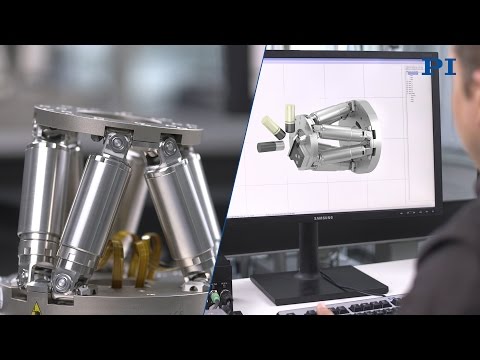
A new tool for calculating workspace and verifying motion for hexapods and the 6DoF Nanocube is called PIVirtualMove.

Not every location within the range of a single axis can be reached with such intricate multi-axis mechanics. Depending on the current position, the installation position, and the pressures and torques operating on the motion platform, the permissible workspace for parallel kinematics varies. As a result, it's important to consider if the points can be reached when choosing the system. In this case, PIVirtualMove supports:

Verifying the reachability of positions using the mounting position, load, and workspace (force and position)

The coordinate system, pivot point, mounting position, and loads are all freely defined.

selecting the components with a link to the data sheet from our database The program can

Direct the future with the power of the past.
Expertise
Markets Technologies
Contact
Nano Dünya Mak. San. Tic. Ltd. Şti.
Parseller Mah. Gündoğan Sok. No:8/A
Ümraniye/İstanbul

02166140039
info@nanodunya.com.tr
Copyright © 2024 by Nano Dünya. All rights reserved.
x
Quote List
Your quote list is currently empty.
x
Download Request
Your download list is currently empty.
0 0 Whatsapp